Is FX Replay good for forex backtesting?
FX Replay is worth testing for browser-based manual forex replay with visible risk, reward and cost controls. Beginner is free, but its two-session, 50-trade and one-week retention limits prevent a long study. Pro is the relevant tier for futures, CME and seconds data.
FX Replay at a glance
| Decision point | Current evidence | Status |
|---|---|---|
| Product type | Browser-based manual market replay and journal | Observed |
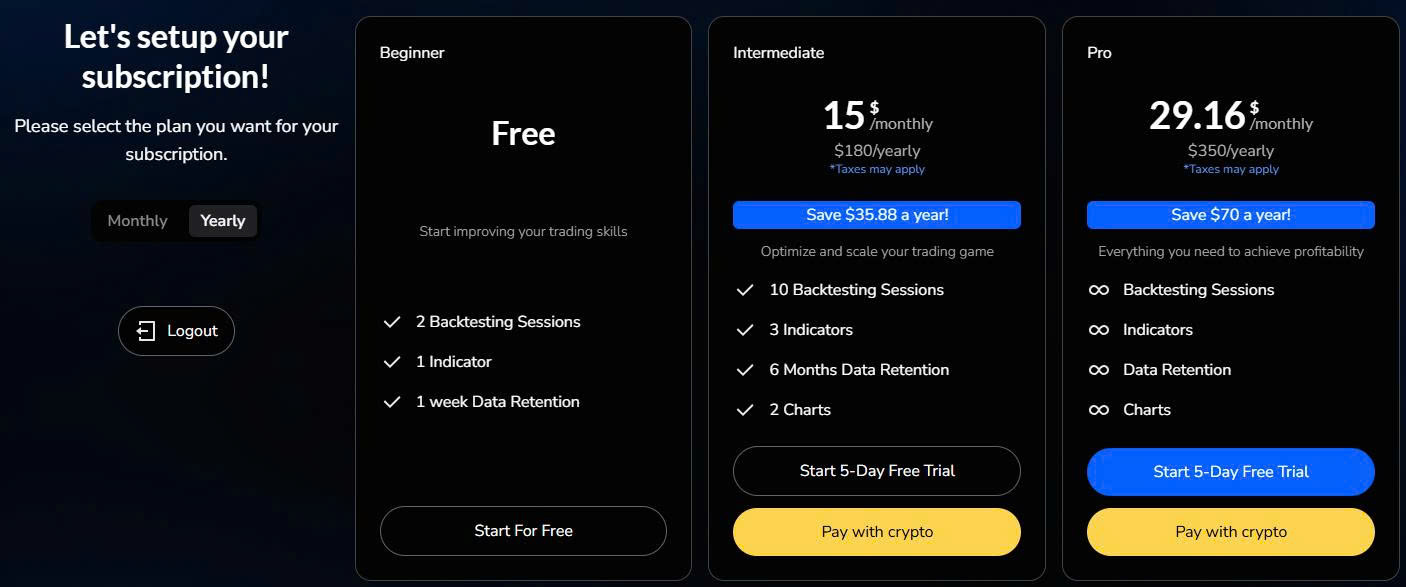
| Free plan | 2 sessions, 50 trades per session, 1 indicator and 1-week retention | Vendor pricing page |
| Annual pricing | Intermediate $180/year; Pro $350/year | Observed November 26, 2026 |
| Paid-plan trial | 5 days shown in the supplied pricing screenshot; verify current signup and cancellation conditions | Vendor help center |
| Pro-only data | Futures, CME and seconds-level intervals | Vendor plan matrix |
| Not tested | Long sessions, multi-chart performance and independent feed accuracy | Not verified |
Test the workflow before choosing a paid plan
FX Replay offers a permanent free Beginner plan. Use it to check the chart, order panel and session limits against your own process before considering a paid trial.
Best for a guided browser replay workflow
FX Replay makes the path from session setup to simulated order placement easy to follow. The strongest evidence is its detailed order panel and configurable cost assumptions. The main limitation in the supplied account screenshots was plan-gated analytics and data retention.
What the supplied screenshots document
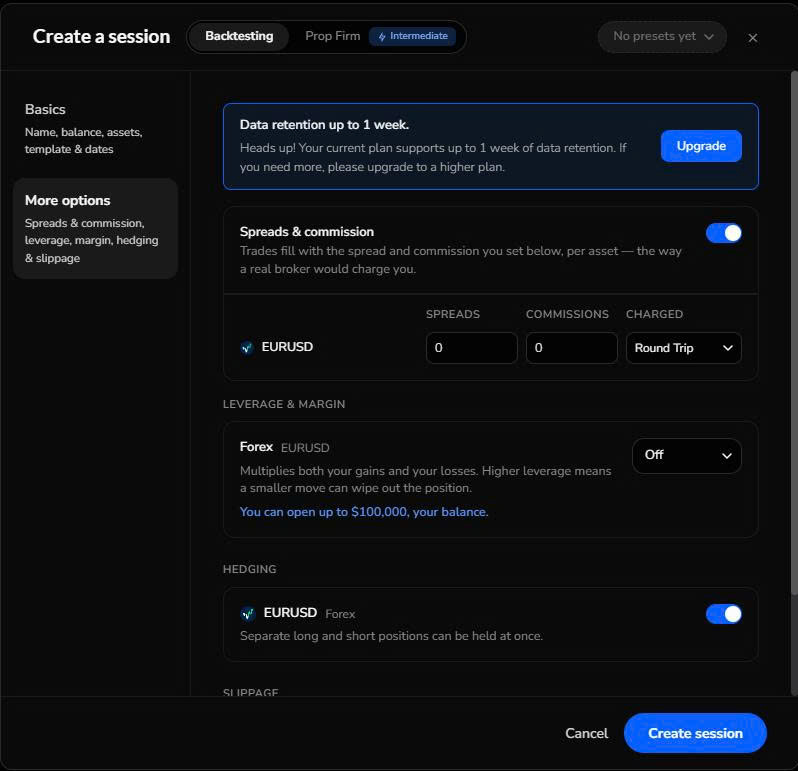
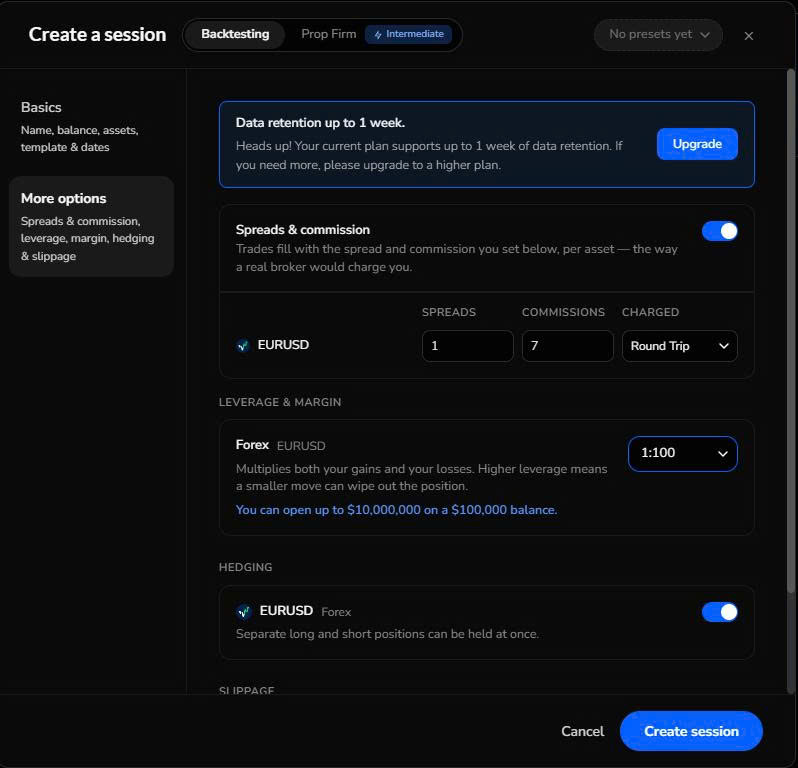
We created a EURUSD replay session, opened the advanced session settings, entered example spread and commission values, reviewed leverage and hedging controls, used the chart replay interface, opened the order panel and inspected the analytics screens.
Order workflow and risk fields
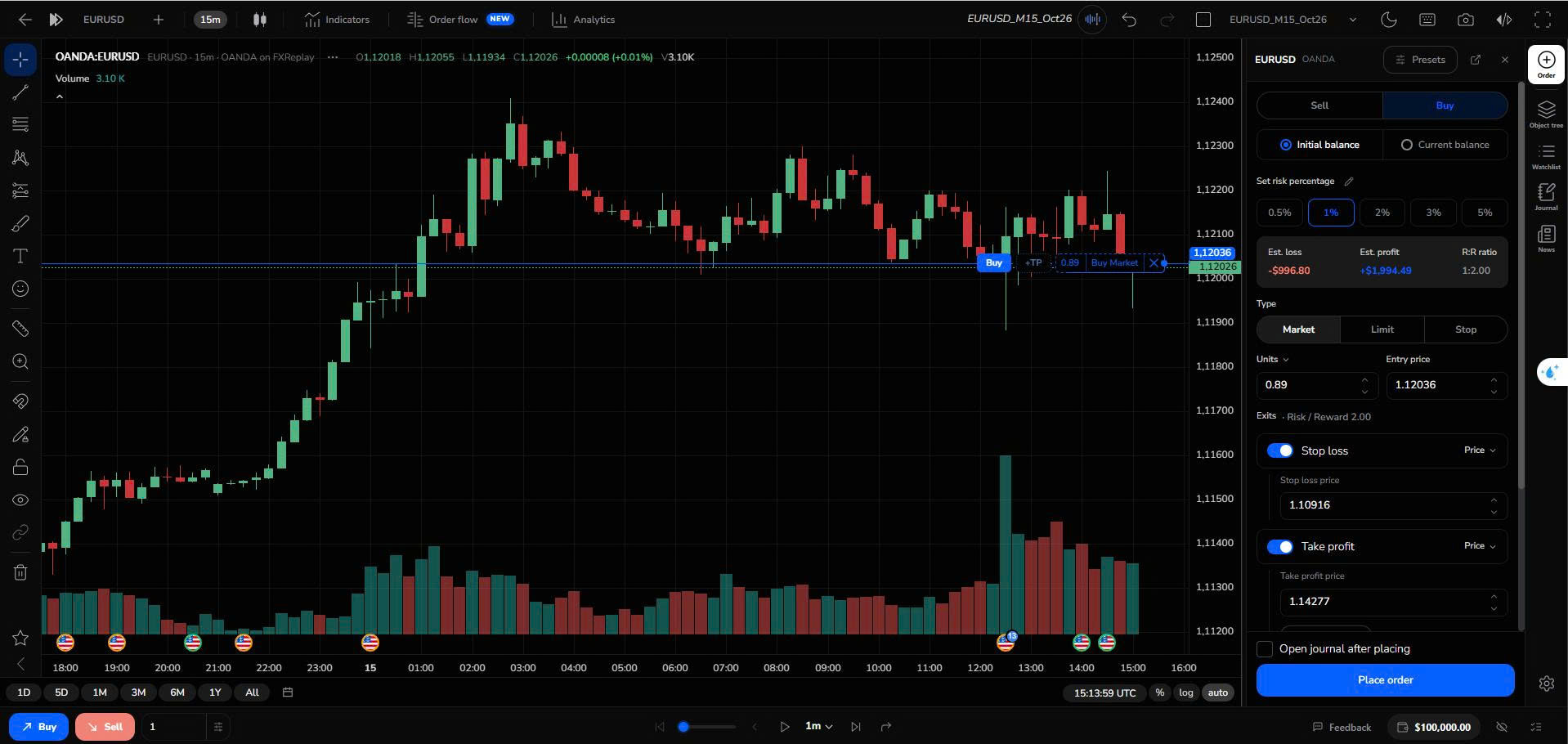
The order panel is the clearest part of the product. It includes market, limit and stop order modes; stop-loss and take-profit fields; a risk percentage; estimated loss and profit; and a displayed risk-to-reward ratio. These fields help structure a simulated decision, but their output depends entirely on the user’s inputs.
The order panel is the feature to test first
Open a free session and check whether the risk percentage, stop-loss, take-profit and R:R fields match the way you record a manual backtest.
Replay interface
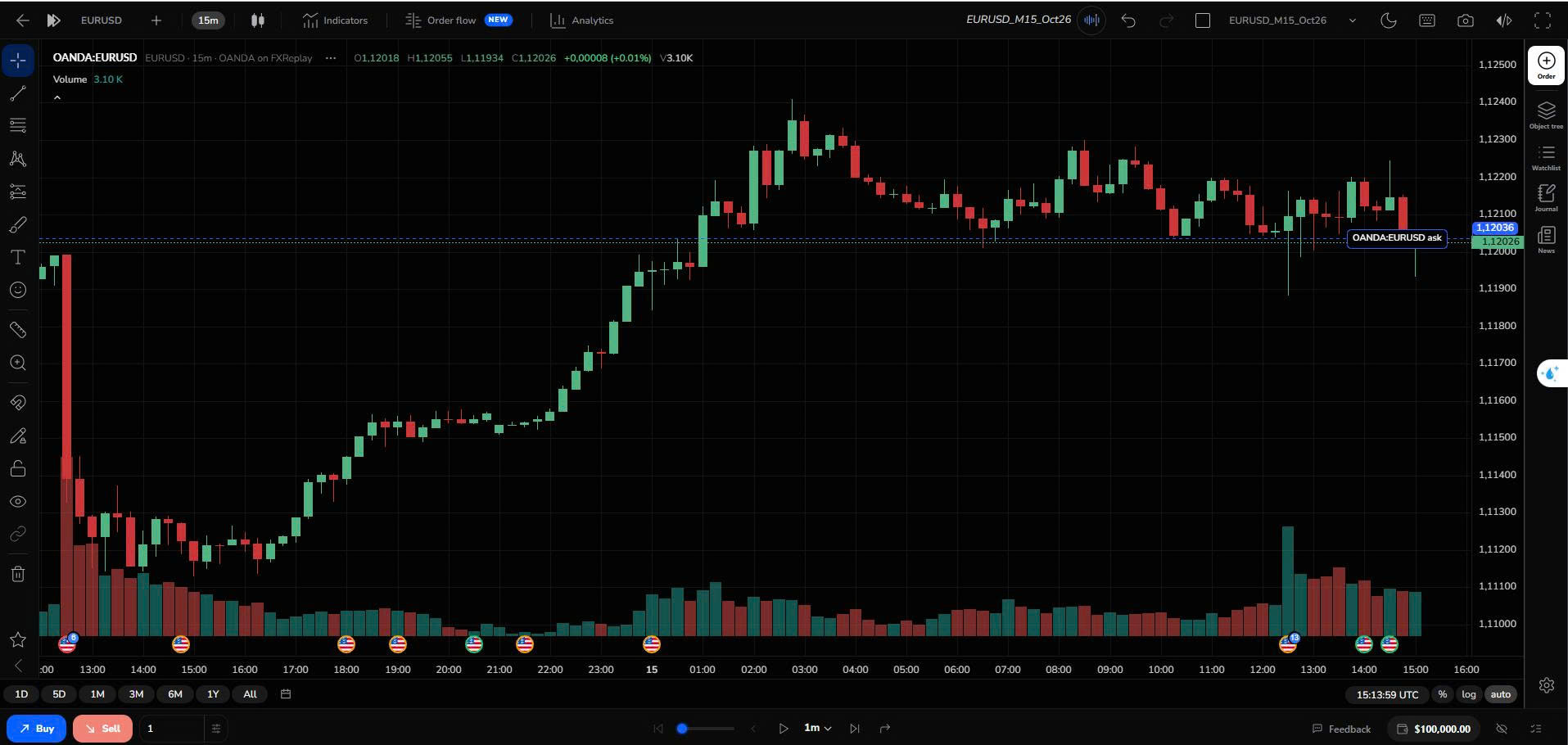
The browser layout keeps the chart, timeline controls and Buy/Sell actions visible together. Economic-news markers were also visible on the chart. We did not test every market, data vendor or paid data range, so this review does not make a completeness claim for the historical feed.
FX Replay vs TradingView Bar Replay
FX Replay is built around persistent backtesting sessions, order-risk fields, a journal and plan-based analytics. TradingView’s official documentation describes Bar Replay as a chart replay feature with synchronized layouts and a separate Replay Trading mode. TradingView says replay trades and results are available only within that session and are not saved. Choose by workflow rather than an unsupported accuracy claim: use TradingView when chart analysis is central; test FX Replay when session records, order-risk inputs and review analytics matter. See the official TradingView Replay Trading documentation.
Analytics and plan limits
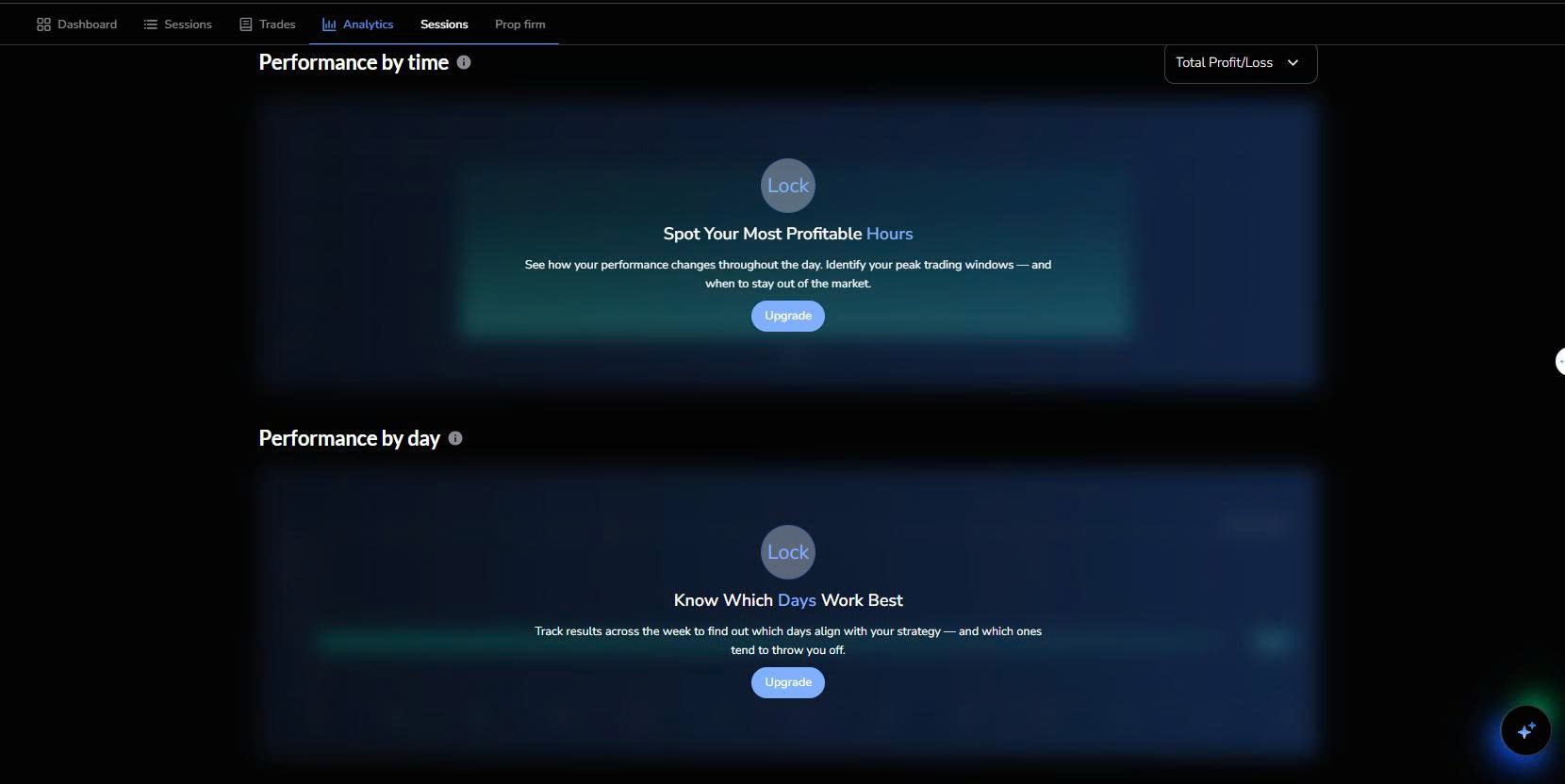
Basic analytics were accessible, while several time-of-day and day-of-week panels were locked behind an upgrade in the tested account. This is a meaningful buying consideration: readers who want deeper breakdowns should confirm which plan unlocks each report.
Pricing observed in the account
The captured plan screen showed a Free tier, an Intermediate tier at $15 per month billed as $180 yearly, and a Pro tier at about $29.16 per month billed as $350 yearly. Because prices and promotions change, use the screenshot as a dated record rather than a permanent quote.
What stood out
- Clear session-to-order workflow
- Visible spread, commission, leverage and hedging inputs
- Detailed simulated risk and reward fields
- Browser-based interface
Limits we observed
- Data retention depends on plan
- Several analytics panels required an upgrade
- We did not test all symbols or paid data ranges
- Backtest outputs remain hypothetical
Who should use FX Replay—and who should skip it?
Consider FX Replay if you want a browser tool, prefer visual manual replay and need a structured order panel. Skip or delay the purchase if you need permanent free storage, tick-by-tick automation, or have not yet built a repeatable testing habit. Futures and seconds-based workflows also require checking whether Pro pricing is justified for your use case.
Questions buyers ask before subscribing
Is FX Replay really free?
Yes. The official pricing page describes Beginner as a permanent free plan with no card or automatic conversion. It is limited to two sessions, 50 trades per session, one indicator and one week of data retention.
How much does FX Replay cost?
On the pricing page checked November 27, 2026, annual billing was $180 for Intermediate and $350 for Pro. Monthly billing was listed separately. Taxes and promotions can change the checkout total.
Does FX Replay offer a paid-plan trial?
The supplied pricing screenshot and FX Replay’s account guide show a five-day trial for Intermediate or Pro. Verify current payment-method, cancellation and billing conditions during signup because vendor wording can change.
How does FX Replay differ from TradingView Bar Replay?
FX Replay centers on backtesting sessions, order-risk fields, journaling and analytics. TradingView centers Bar Replay inside its charting workspace; its official Replay Trading guide says trade results are kept only in the current session.
Does FX Replay include futures and seconds charts?
Yes, but the official plan matrix places futures, CME data and seconds-level intervals on Pro. The help center says supported futures can go as low as one second, while supported forex CFD pairs start at five seconds.
What happens to saved work on the free plan?
The plan matrix shows one-week retention. FX Replay’s support documentation distinguishes session duration from data retention and says plan limits apply after downgrade. Confirm the current retention behavior before relying on the free tier for a long study.
Does this review prove FX Replay data is accurate?
No. The screenshots document visible controls, not a feed benchmark. We have not compared its historical data with an independent tick source, so this review does not make an accuracy claim.
Primary sources checked
- FX Replay pricing and plan limits
- FX Replay markets, data ranges and plan availability
- Seconds timeframe availability
Check the current FX Replay plans
Review the live plan, included data and checkout terms before subscribing.
View current FX Replay pricingAffiliate link · FX Replay’s Head of Affiliates authorized affiliate promotion on this independent comparison website on November 26, 2026. That authorization was not an editorial endorsement of this review.