Is Soft4FX worth considering?
Soft4FX is worth shortlisting if you already use Windows and MetaTrader and prefer a one-time license over another browser subscription. The free demo lets you inspect the workflow before paying, but its five-trades-per-simulation limit, two sample years and disabled save/load function mean it is a product check rather than a full strategy study.
Soft4FX at a glance
| Decision point | Current evidence | Status |
|---|---|---|
| Product type | Installed forex simulator add-on for MetaTrader 4 and 5 on Windows | Vendor-stated |
| Free demo | Unlimited time; 5 trades per simulation; 2 sample years; no save/load | Vendor pricing page |
| Lifetime price | $109 before applicable tax; one user and two MetaTrader accounts | Vendor-stated November 27, 2026 |
| System requirement | Windows plus MT4 or MT5; MT5 currently requires .NET 8 or later | Vendor download page |
| Refund | 14-day money-back period stated on the pricing page | Vendor-stated |
| Not tested | Installation, current interface behavior, data quality and performance in our environment | Not verified |
Try the Soft4FX demo before buying
Visit Soft4FX and select Download for the demo. Save 15% on the full license with code MINUS15-ID16488.
Best fit for MetaTrader users who want an installed replay workflow
The strongest buying case is the combination of familiar MT4/MT5 charts, a free demo and a lifetime license. The largest friction is setup: Soft4FX is an add-on rather than a browser app, and the current MT5 build requires Windows 10/11, MetaTrader 5 and .NET 8 or later.
How the Soft4FX workflow fits together
This diagram summarizes the official installation and product manuals. It is an editorial workflow map, not a recreation of the application interface.
What the free demo can and cannot prove
Useful for checking
- Whether installation succeeds on your Windows and MetaTrader setup.
- Whether the replay controls and order workflow feel understandable.
- Whether the available sample data is enough to inspect charts and statistics.
Not enough for validating
- A long multi-session research process.
- Save and resume behavior, because save/load is disabled in the demo.
- Every instrument, historical year or real-world execution condition.
Features buyers should verify in the demo
| Decision area | What official documentation describes | What to verify yourself |
|---|---|---|
| Replay control | Pause, resume, adjust speed, move forward and backward. | Whether navigation remains smooth in your normal chart layout. |
| Order workflow | Market and pending orders, stop loss, take profit and visual placement. | Whether the controls match your journaling and sizing process. |
| Risk sizing | Position sizing based on a percentage or account-currency amount when a stop is defined. | Whether the calculation matches an independent manual example. |
| Session records | Save/load in the full version, statistics and report/history exports. | Whether the exported fields cover the analysis you actually perform. |
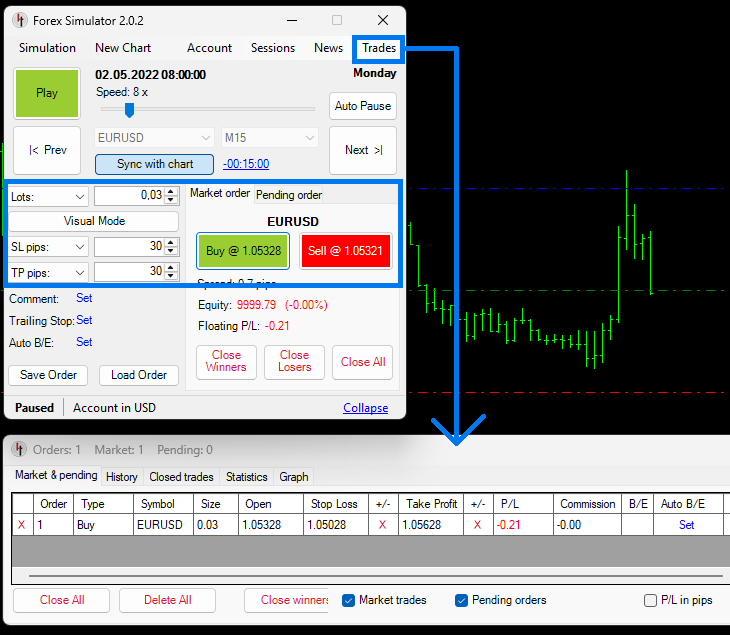
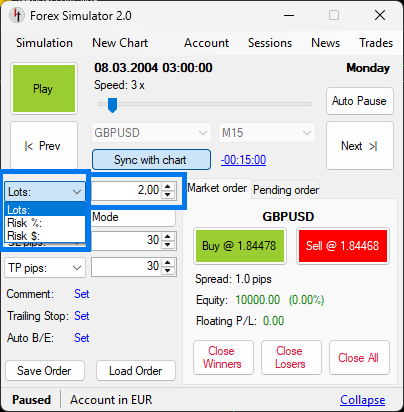
Pricing and license checkpoints
The official pricing page currently lists a free demo and a $109 lifetime license before applicable tax. It says the paid license includes MT4 and MT5 versions, free updates, 10–20 years of tick data and a 14-day money-back period. One license is for one user and can be active on two MetaTrader accounts. Treat these as dated vendor terms and confirm the checkout before purchasing.
Who should use Soft4FX—and who should skip it?
Consider Soft4FX if you already work in MetaTrader, use Windows, want an installed simulator and prefer a one-time payment. Skip or delay it if you need a browser-only workflow, use a Mac without a Windows virtual machine, or want a tool that works without MetaTrader and .NET setup.
Questions to answer before buying
Does Soft4FX work in a browser?
No. The official download page describes it as an add-on for MetaTrader 4 or MetaTrader 5 on Windows.
Does Soft4FX work on Mac?
Not natively. The official pricing FAQ says Soft4FX requires Microsoft Windows and can be used on a Mac only through a Windows virtual machine.
Is the free demo time-limited?
The official pricing page says the demo has unlimited time and all features, but restricts each simulation to five trades, provides two sample years and disables saving and loading.
Does a license include both MT4 and MT5?
The current pricing page says both versions are included in the lifetime license. The documented platform requirements differ, so check the download page before installing.
What is the Soft4FX refund period?
The official pricing page states a 14-day money-back period and recommends testing the free demo before purchase. Current eligibility remains governed by the vendor’s refund terms.
Does this review prove Soft4FX is accurate?
No. Official feature descriptions and interface demonstrations do not prove feed accuracy. A controlled comparison needs the same symbol, period, timezone and defined reference data.
Official visual guides and screenshots
Soft4FX confirmed in writing on November 26, 2026 that this site may use screenshots and pictures from its website, including resized and annotated versions. The images below remain vendor documentation, not evidence that we independently ran the software.
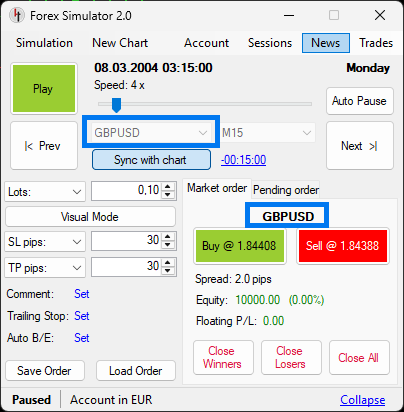
- Official MT5 user manual
- Official MT5 order and risk-sizing guide
- Official MT4 installation guide
- Official MT4 trading guide
Primary sources checked
- Soft4FX pricing, demo limits, license and refund information
- Soft4FX current downloads and system requirements
- Soft4FX affiliate program and discount-code information
- Soft4FX end-user license agreement
Check the current license and demo
Visit Soft4FX and select Download for the demo. Save 15% on the full license with code MINUS15-ID16488.